Evaluate your offer with the full cost picture.
Bring purchase, acquisition, repairs, carry, financing and selling costs together. See the maximum offer that fits your entered profit target.
 THINK FLOWSTATEFrom chaos to clarity.
Bring purchase assumptions, renovation costs, financing and project milestones into one workspace. Evaluate the deal, follow the money, and give your partners a clear investment case.
Already have access? Open ProFlip or visit My Apps.

This worked example shows a projected profit below its entered target. That is useful information before you commit. Change the sale price, costs or hold assumptions to understand what the opportunity needs.
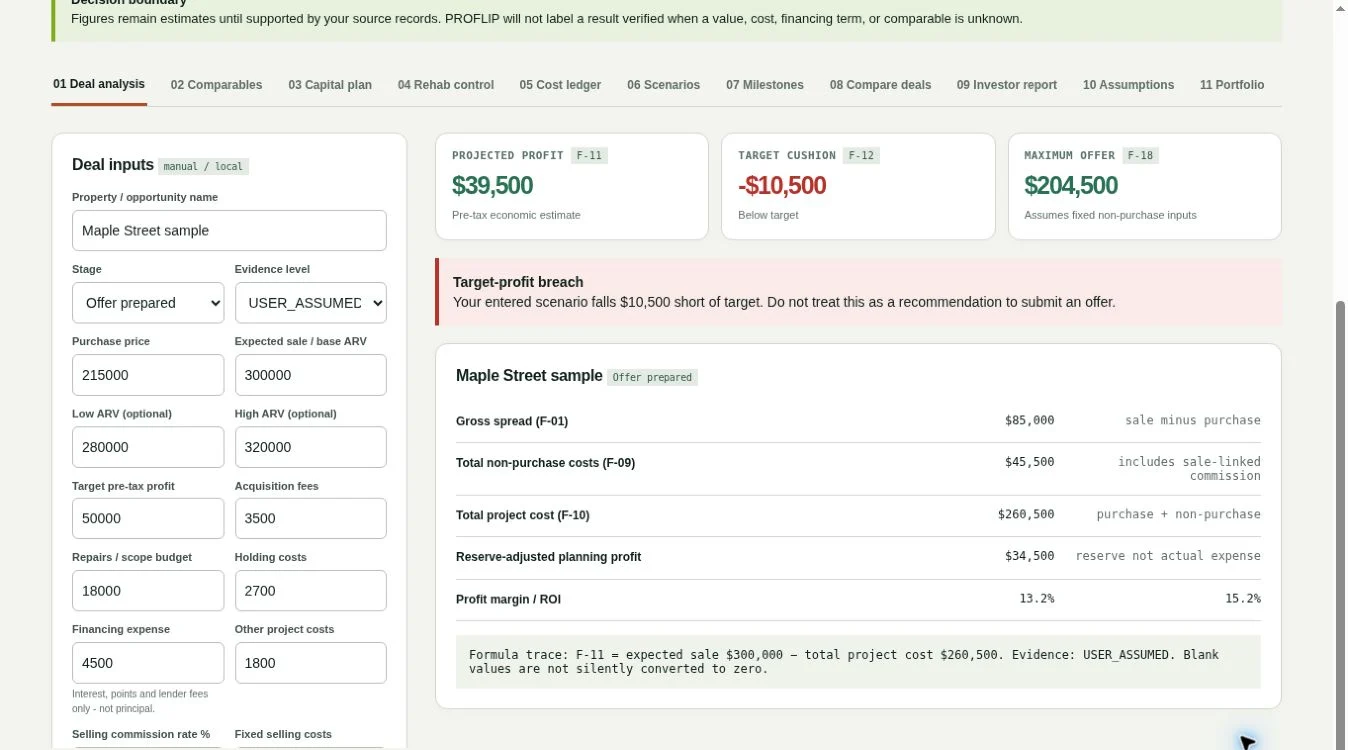
A purchase price is only the start. Repair allowances, selling costs, financing and extra months of ownership all change the result. ProFlip keeps those assumptions connected as you move from evaluating a property to managing the renovation.
Bring purchase, acquisition, repairs, carry, financing and selling costs together. See the maximum offer that fits your entered profit target.
Separate budget, approved changes, commitments, costs and payments. Review forecast-at-completion without counting the same expense twice.
Keep comparable-sale references and diligence notes beside the financial case. Create an organized investor report for a partner discussion.
Enter the property, costs, resale assumptions and financing terms.
Review price and delay scenarios, capital needs and the renovation forecast.
Save milestones and supporting records; freeze an investor report when ready.
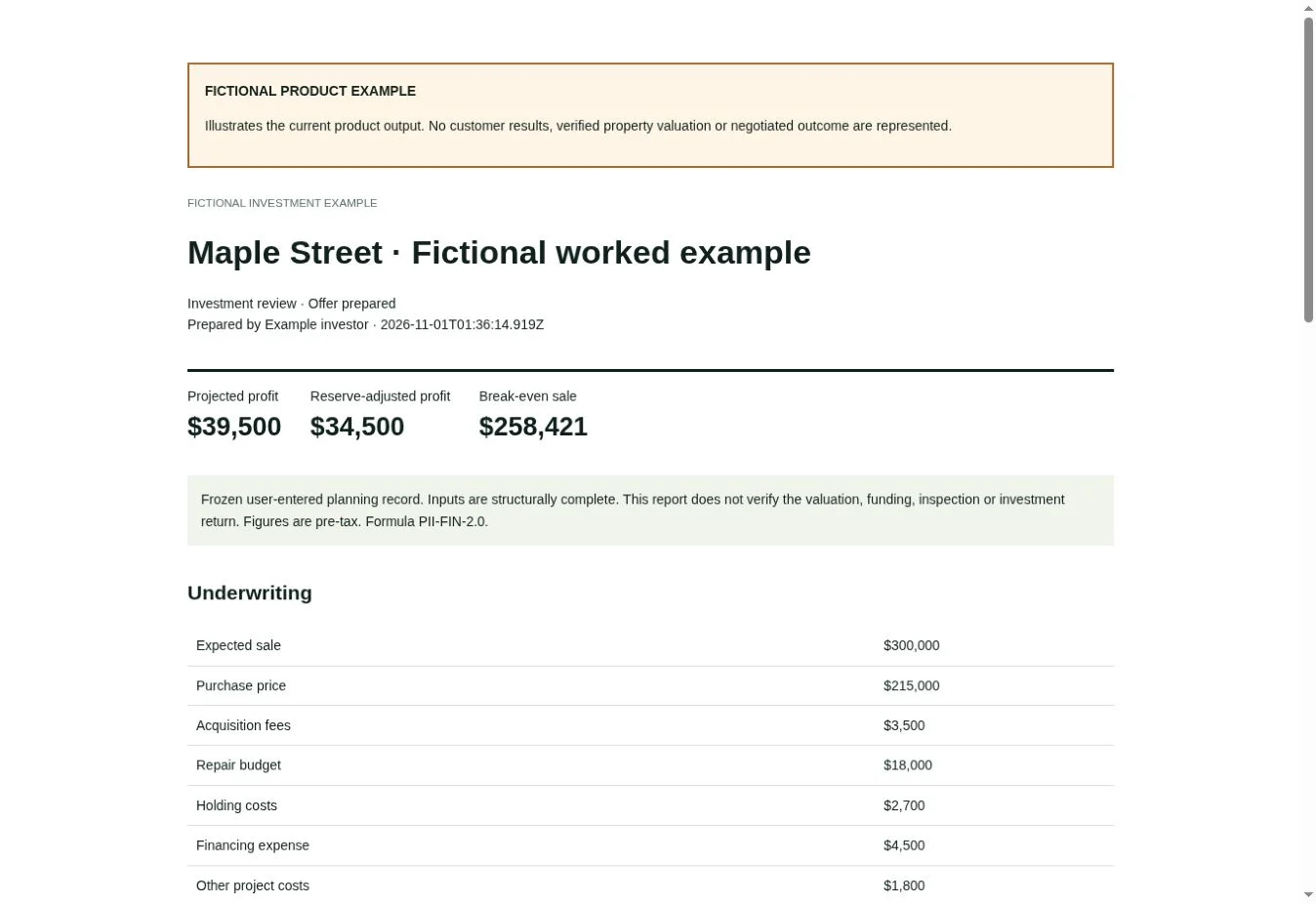
Open a fictional example report to see the underwriting, capital plan, renovation forecast, comparable records and diligence questions in one document.
Fictional example for product demonstration. No account is needed to view it.
One user per plan. Sign in with your verified FlowState account before purchasing. Owner-granted access is available through My Apps.
$29/month
$29 per month · one user
Use ProFlip after verified payment and sign-in with your purchase email. Internet required for account saving and official reports.
One user. Renews at $29/month until canceled. Cancel renewal in My Apps before the next billing date; access continues through the paid period. Existing saved data can still be exported after access ends. No live MLS or lender connection is included.
Checking your account…
Sign in or create an account →$290/year
$290 per year · one user
Protected hosted application; sign in using your purchase email.
One user. $290 charged today and each year until canceled. Turn off renewal in My Apps before the next billing date. Paid-period access and export of your saved data are preserved.
Checking your account…
Sign in or create an account →Independent flippers, property investors and small investment operations who want their deal assumptions, renovation control and investor presentation in one place.
Comparable sales and their sources are entered by you. ProFlip organizes those records and calculations; live MLS feeds, appraisals and verified resale values are not included.
One-user access, up to 30 saved projects, account workspace backup, the analysis and renovation tools, and investor reports. See the plan details for storage and renewal terms.
Yes. Export the report or print/save it as PDF for the intended discussion. Your editable application workspace stays in your account.
Turn off renewal in My Apps before the next billing date. Access continues through the paid period; saved account data remains exportable afterward.
Sign in and open your purchased or owner-granted app from My Apps.
Choose Install app inside the workspace. Supported browsers offer installation or Add to Home Screen.
Save your account workspace when online. Export backups and keep report copies for your archive.
ProFlip Investor Workspace 2.0 is available through the hosted app. A paid plan and verified sign-in are required. Choose Save project to save your workspace locally and queue its account backup. Export project backups and download frozen reports separately. Prices, comparables, costs and loan terms are user-entered assumptions; the app does not supply an appraisal or verified return. The capital planner models one interest-only loan, charging full-principal interest for the planned hold. Reports are pre-tax planning records, not tax filings or investment recommendations.
Live MLS / valuation feeds, bank and lender connections, receipt extraction, team permissions, team collaboration and a draw-by-draw cash schedule are not connected. Discuss these requirements with FlowState for a commercial team deployment.
Start with the property you are considering and the assumptions you can support.