Start from the inspection, not an empty document.
Convert text-based NSPCT PDFs into editable findings and a draft report. Review the source wording, page references and available PDF excerpts before finalizing.
 THINK FLOWSTATEFrom chaos to clarity.
Turn repair findings into clear budgets and seller requests. Enter your own items or optionally import an NSPCT PDF, review safety priorities, compare sourced repair ranges or custom estimates, and set completion dates.
Already have access? Open RepairRank or visit My Apps.

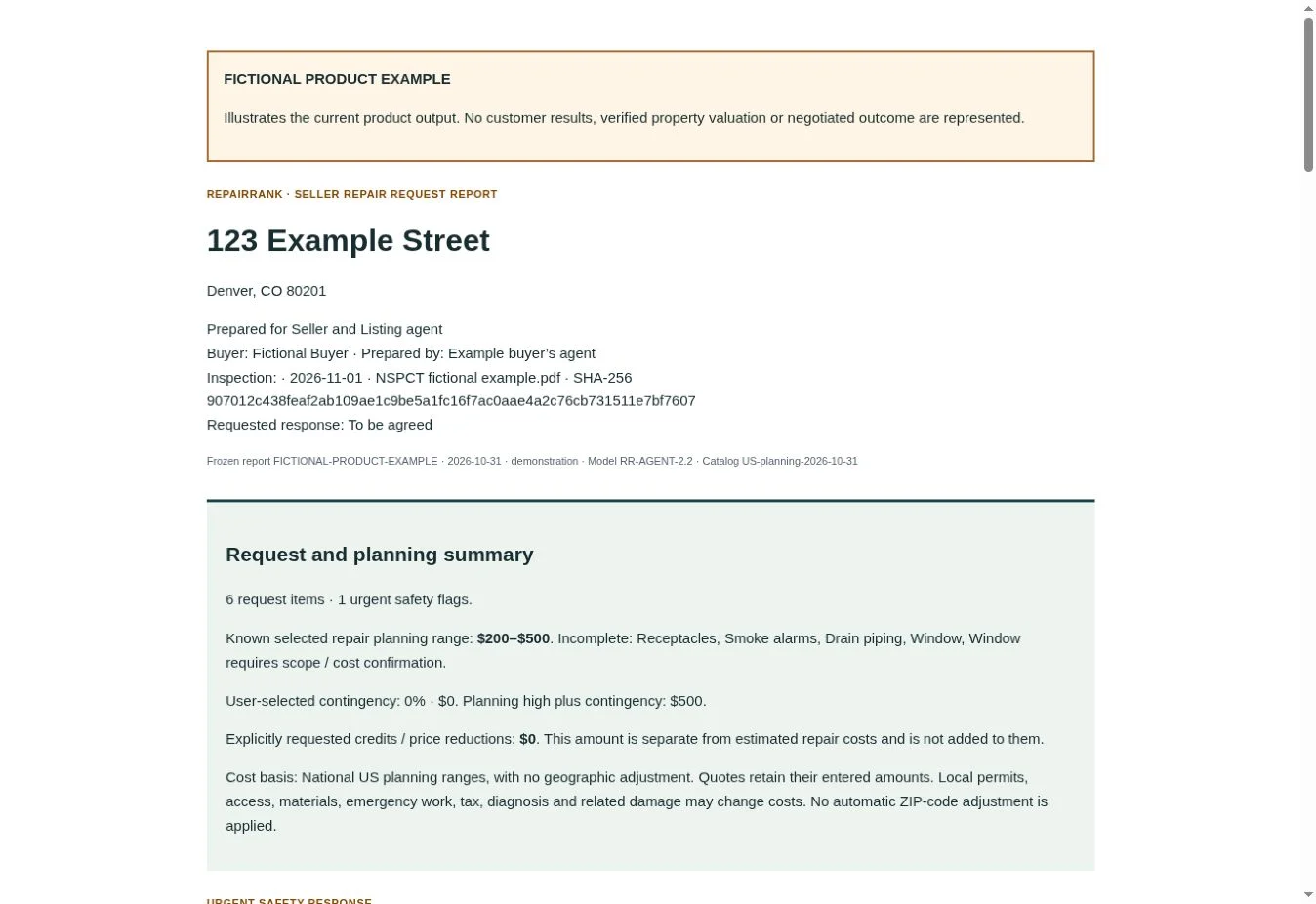
The test inspection behind this example contains eight component blocks. RepairRank organizes seven findings and limitations, proposes six request items, and flags an urgent electrical concern. Source-page references stay attached so the agent can check the conversion.
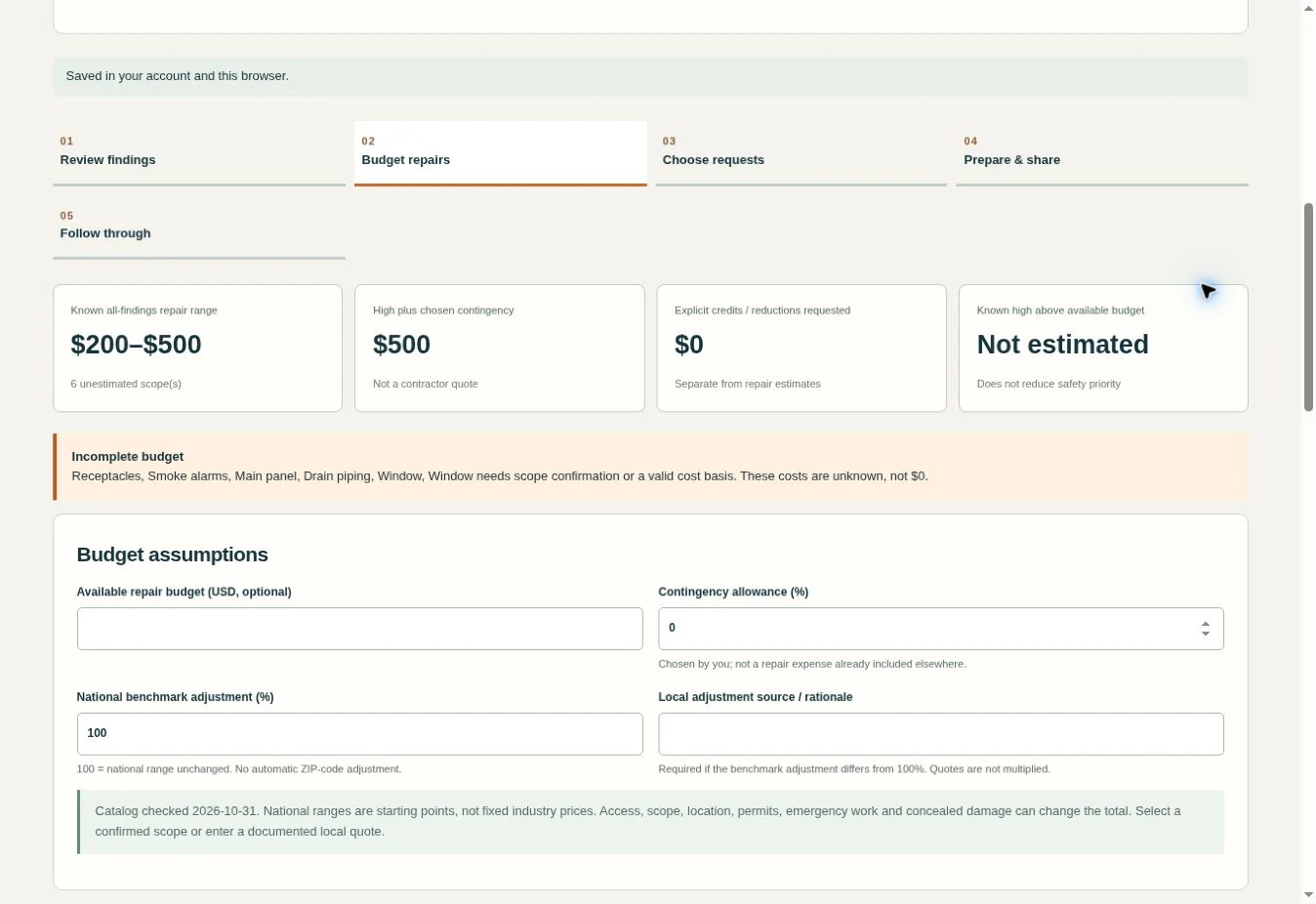
An inspection gives you findings, photos and references. A buyer still needs help deciding what matters, what needs evaluation, and what to ask for. RepairRank brings those decisions into a structured review and request workflow.
Convert text-based NSPCT PDFs into editable findings and a draft report. Review the source wording, page references and available PDF excerpts before finalizing.
Potential hazards stay prominent independently of price or request selection. Separate “Not Inspected” and “Not Present” from confirmed defective conditions.
Choose repairs, evaluations, credits or price reductions. Add sourced planning ranges or contractor quotes, then preserve the agreed responsibilities and follow-through records.
Add your own repair findings, or optionally import an NSPCT PDF. Check the evidence and source references.
Review safety flags, confirm scopes and costs, and decide what to ask for.
Freeze the request report, print/save a PDF, and track responses and agreed work.
Compare the fictional source inspection with its example RepairRank request report. The example includes a reviewed roofing planning range and identifies the other items that still need scope or quote confirmation.
Fictional example for product demonstration. No account is needed to view it.
One user per plan. Sign in with your verified FlowState account before purchasing. Owner-granted access is available through My Apps.
$19 / property
$19 · one property
The first official report assigns the license to its entered property address. Revisions for that property do not use another credit. Additional properties require another property license or an active monthly plan.
$19 one-time for one property address. Draft planning is included. A property license is used when the first official seller report is frozen. No automatic renewal. Estimates are planning ranges; findings, evidence and requests require your review.
Checking your account…
Sign in or create an account →$49/month
$49 per month · 5 new properties
A property counts when its first official seller report is frozen. Revisions do not consume another monthly slot. Unused monthly slots do not roll over. Purchased one-property credits are separate.
One user. $49/month until canceled. Includes five new property addresses per Stripe billing period. No rollover or automatic overage charge. Cancel renewal in My Apps; access lasts through the paid period. Saved data remains exportable after access ends.
Checking your account…
Sign in or create an account →No. Agents, buyers and other reviewers can create findings and reports directly, choose sourced repair planning ranges or enter custom estimates, set urgency and completion dates, and record radon measurements. NSPCT PDF import is an optional convenience.
Text-based NSPCT continuity and full-photo PDFs, up to 50 MB and 200 pages. Scanned/image-only PDFs require OCR first. Other report formats can be entered or pasted manually; universal PDF conversion is not included.
No. Conversion and draft preview do not consume a property license. The first official seller report assigns a license to the property; revisions follow your plan’s property rules.
The catalog contains dated, source-linked national planning ranges. You must confirm the matching scope or enter a documented local quote. They are not live local prices or guaranteed final repair costs.
You review and send requests. RepairRank can prepare reports and email drafts, but generating a report does not send it, secure agreement or replace the parties’ transaction forms.
Yes. Account workspace backup supports continued work when online. Keep exported property backups and report copies for your own archive.
Sign in and open your purchased or owner-granted app from My Apps.
Choose Install app inside the workspace. Supported browsers offer installation or Add to Home Screen.
Save your account workspace when online. Export backups and keep report copies for your archive.
RepairRank Agent Workspace 2.2 is available through the hosted app. A paid property license or active monthly plan and verified sign-in are required. Drafts save locally and to your account when online; finding and follow-through forms require their Save button. Published national planning ranges were checked October 31, 2026 and are not live local quotes. Text rules cannot guarantee hazard detection. Closing a follow-through item does not resolve a safety flag or change a frozen request report. Export property backups and archive reports before clearing browser data. The report is a proposed request record, not a signed contract amendment.
NSPCT text-based PDFs can be converted into reviewable draft workspaces with page references and source excerpts. Scanned PDFs require OCR first. Brokerage team workspaces, e-signatures, live local contractor pricing and transaction-management connections are not connected. Requests and emails remain subject to your review and sending.
Choose a single-property license or a monthly plan for regular transaction work.